


In its quest for speed, not “speed” as in search speed but the speed of making decisions based on the search results, Google has added yet another feature called Instant Previews. What this does is to let you get a quick peek at the webpages, when you click on the new magnifying glass icon next to the corresponding search results. If you don’t already know, you can also navigate Google’s search results by using the up/down keys on your keyboard and activate Instant Previews by hitting the right arrow key.
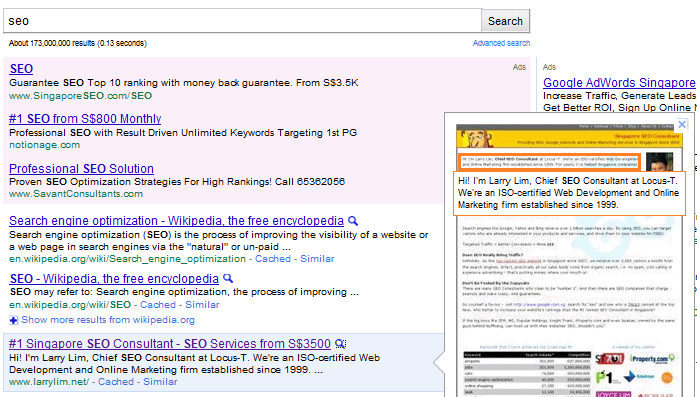
Although Instant Previews is not something ground-breaking (Bing has been having it since launch), I personally think it’s a far more useful feature than Google Instant. Firstly, this new feature definitely beats visiting all the websites in the search results and waiting for the full webpage to load. According to Google, the entire process from matching the search query to the index, to serving the preview takes less than 1/10th of a second!
Secondly, Google highlights the snippet where the search term appears on the webpage preview (see orange box in the image above), so that you can quickly decide if it’s exactly what you’re looking for.
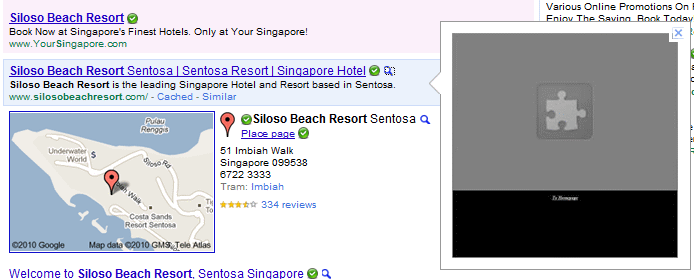
Based on what I’ve been reading, Instant Previews has zero impact on SEO. Infact, clicking on the magnifying glass and triggering the preview, does not even count towards “visits” to your website. What’s likely going to have a huge impact are the click-through rates (CTR) - poorly-designed websites (read: UGLY websites), especially Made-for-Adsense websites, are going to be hit the hardest. If you’re prompted to re-design your website because of this new feature, the guys over at Creative Bits have written some tips on designing your website for Google Instant Previews. Do note that Instant Previews doesn’t display some of the web elements, e.g. Flash:
> Learn more about our guaranteed Search Engine Optimization services from S$3,500


What you have shared here in your blog applies to me.. Sometimes my site is in the instant preview of Google search. But proper optimization like your site could bring better traffic that could lead to success or purpose of your site.
Thank you for you post!
Rosendo Cuyasen
Eyewebmaster
Comment by Rosendo Cuyasen on December 29, 2010 at 1:09 pm